

Domains and TLS
You can manage cluster-level domains from the Domains view. You can register single hostname or wildcard domains and bind them to public or private traffic classes.
Domain types
Section titled “Domain types”- Wildcard domains:
*.example.comfor multiple deployment hostnames on the same traffic class. You can optionally route the base hostnameexample.comwith the same certificate. (recommended) - Hostname domains:
app.example.comorexample.comfor one exact hostname. Choose automatic HTTP-01 validation or DNS-01 validation with a CNAME record.
Notes:
- Wildcards are single level.
*.example.commatchesapp.example.com, notapp.dev.example.com. The wildcard name does not matchexample.com; use the base hostname option to route it with Edka’s certificate for both names. - Wildcard domains can target public Gateway API classes, private
MetalLB-backed Gateway API classes, legacy ingress controllers, or
Tailscale tailnet (BYOD)Gateway classes. - DNS-validated hostname domains can target public or private managed Gateway
API classes, including MetalLB private VIP and
Tailscale tailnet (BYOD)classes. Hostname domains are not available for legacy ingress controllers. - HTTP-01 hostname validation requires a public Gateway API class. DNS-01 does not require public reachability and works with public or private Gateway API classes.
- Direct
tailscaleingress endpoints do not use the Domains view. When you select the directtailscaletraffic class, Edka builds the hostname from your tailnet DNS name and Tailscale manages the certificate. See Tailscale Tailnet Traffic Exposure. - The Cloudflare connector does not replace the Domains view. It advertises the cluster private subnet so private MetalLB-backed domains can be reached by WARP users.
Add a domain
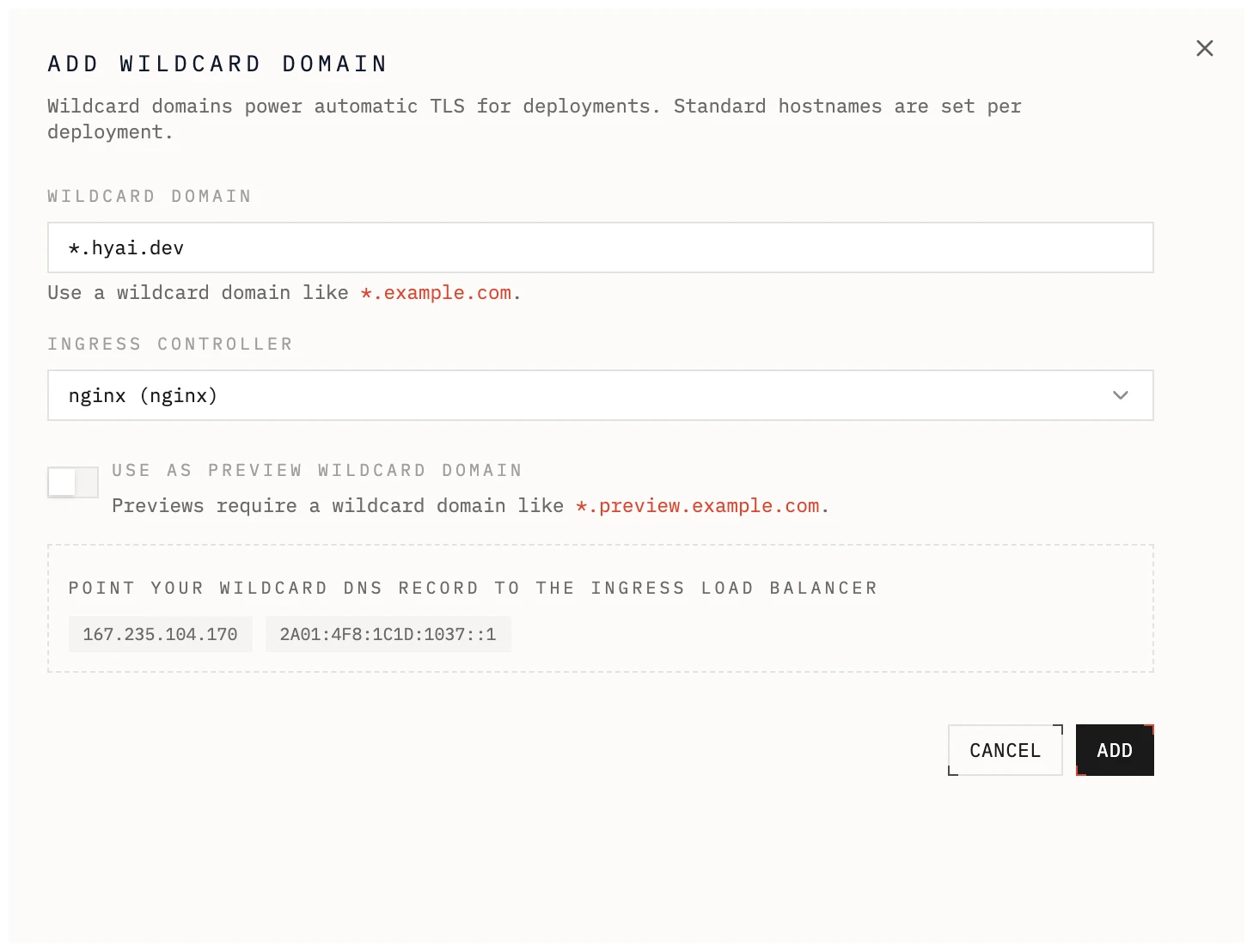
Section titled “Add a domain”- Open a cluster and go to Domains.
- Add either
*.example.comorapp.example.com. - For a hostname domain, choose HTTP challenge (automatic) or DNS challenge (CNAME) under Certificate Validation.
- For a wildcard domain, optionally enable Include
example.comto route the base hostname with the same validation and certificate. - Select the traffic class.
DNS records
Section titled “DNS records”The Domains view shows the recommended DNS records for the selected traffic class using its live endpoints.
Automatic setup
Section titled “Automatic setup”When the domain is hosted with a supported DNS provider, the domain details
page shows a provider named button, for example Configure with Cloudflare.
Select it, review the records on the provider’s page, and approve them. The
provider creates the records shown for the domain, set to DNS only, including
the _acme-challenge delegation record when the domain uses DNS validation.
After you return to Edka, the domain status updates as DNS propagates, and
certificate provisioning starts once the delegation record is verified.
Automatic setup works with DNS providers that support Domain Connect. If the button is not shown for your domain, create the records manually as described below.
Public Gateway API or legacy ingress controllers
Section titled “Public Gateway API or legacy ingress controllers”- Use the A or AAAA records shown in the UI.
- For wildcard domains, point the wildcard record at the controller endpoint.
- For hostname domains, point the exact hostname at the controller endpoint.
MetalLB private VIP Gateway classes
Section titled “MetalLB private VIP Gateway classes”- Use the private A record shown in the UI for the selected Gateway class.
- Wildcard domains and hostname domains using DNS-01 are supported on this path.
- Clients must be able to route to the cluster private subnet, for example through Cloudflare Zero Trust private routing, VPN, or another routed private network.
- HTTP-01 certificates are not available on this path because the selected Gateway class is private.
Tailscale tailnet (BYOD) Gateway classes
Section titled “Tailscale tailnet (BYOD) Gateway classes”- Use the routing CNAME shown in the UI for each wildcard or hostname domain.
- Use DNS-01 validation for certificate issuance because the traffic class is private.
TLS behavior
Section titled “TLS behavior”DNS-01 validation
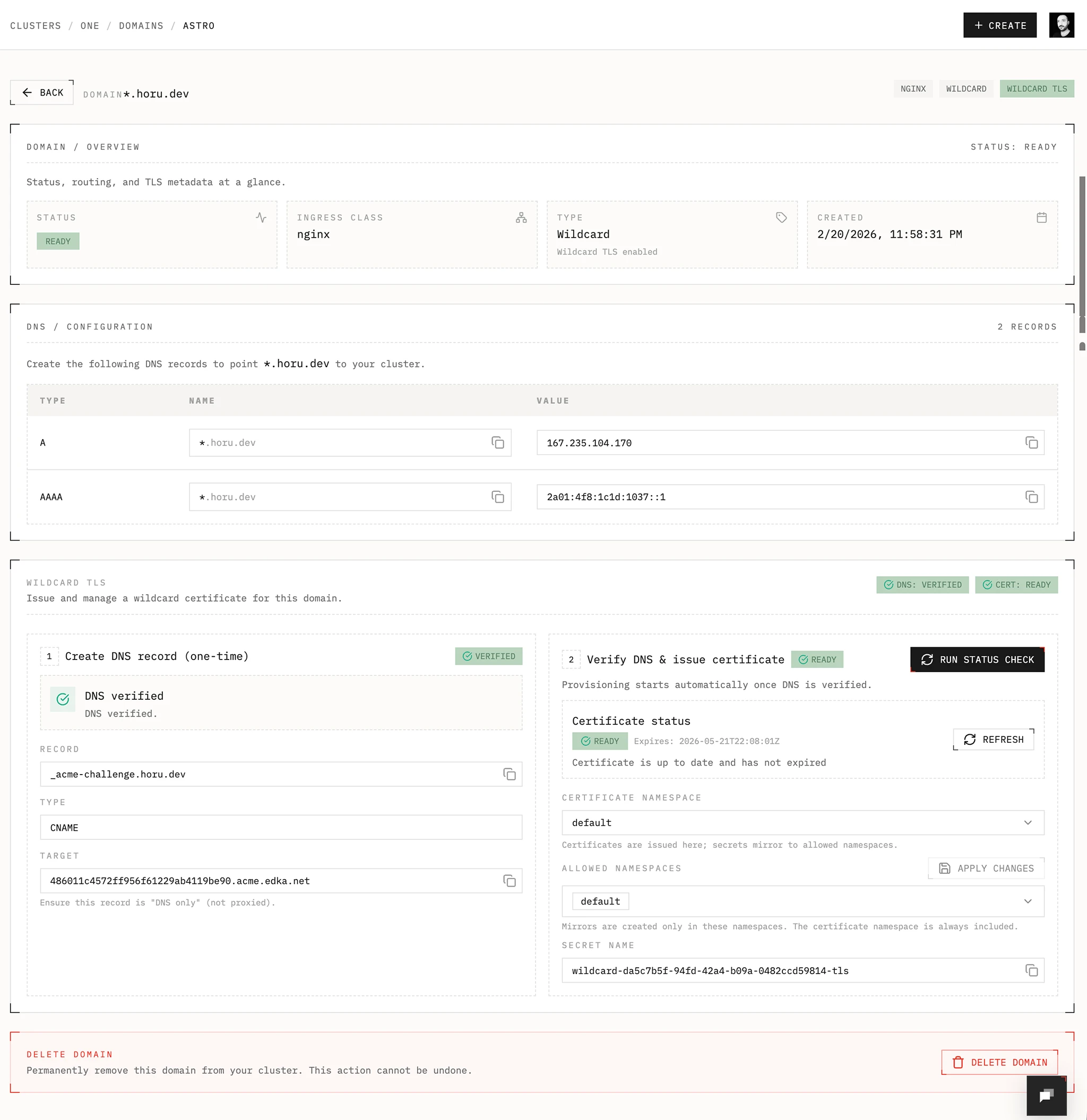
Section titled “DNS-01 validation”Wildcard domains always use DNS-01. Hostname domains can use DNS-01 when you do not want to depend on public HTTP reachability. Edka provisions and renews both certificate types with cert-manager and the Edka DNS-01 webhook inside your cluster.
DNS-01 works for both public and private Gateway API traffic classes, including
MetalLB private VIP and Tailscale tailnet (BYOD) classes.
DNS delegation
Section titled “DNS delegation”Automatic setup creates the delegation record for you. The steps below are only needed when you manage DNS records manually.
- Open the domain details and select Generate DNS record.
- Create the delegation record shown by Edka:
- Name:
_acme-challenge.example.comfor*.example.comorexample.com, and_acme-challenge.app.example.comforapp.example.com - Type:
CNAME - Target:
<delegation-id>.acme.edka.net
- Name:
- Make sure the record is DNS only, not proxied, then select Run status check. DNS propagation can take up to 48 hours.
- Provisioning starts automatically after DNS is verified. Use Refresh to check certificate progress.
Keep the CNAME in place so cert-manager can renew the certificate automatically. This ACME delegation record is separate from the A, AAAA, or CNAME records that route application traffic.
Include the base hostname with a wildcard
Section titled “Include the base hostname with a wildcard”The wildcard name *.example.com does not cover example.com by itself.
Edka’s managed wildcard certificate includes both names. Enable Include
example.com when you create the wildcard, or add it later from the domain
details page. The option adds routing for example.com and offers it as a fixed
domain for deployments and apps without creating another certificate.
Create the routing records shown for both *.example.com and example.com
when the base hostname is included.
The base hostname cannot be included if it is already configured as a separate
hostname domain. A separate DNS-01 hostname domain also cannot share the same
_acme-challenge record with its covering wildcard; use the wildcard’s base
hostname option instead. On a public Gateway, a separately HTTP-validated base
hostname can coexist with the wildcard while the base hostname option is off.
Requirements
Section titled “Requirements”- cert-manager add-on
- Edka DNS-01 webhook add-on
- Reflector add-on if you want to mirror secrets to multiple namespaces (only necessary for legacy ingress controllers)
Namespaces and secrets
Section titled “Namespaces and secrets”- Certificate name:
wildcard-<domain-id> - Secret name:
wildcard-<domain-id>-tls - Hostname certificate name:
hostname-<domain-id> - Hostname secret name:
hostname-<domain-id>-tls - Default namespace:
envoy-gateway-system. For legacy ingress controllers, the default namespace isedka-system. - Allowed namespaces control where the secret is mirrored. (not necessary when using Gateway API)
- If you plan to have a deployment in a namespace other than the default, for example the
productionnamespace, you need to add the namespace to the allowed namespaces. The Reflector add-on will mirror the secret to the other namespaces. (only necessary for legacy ingress controllers)
Single hostname domains
Section titled “Single hostname domains”- HTTP challenge (automatic) provisions a Let’s Encrypt certificate using HTTP-01 on the selected public Gateway. The hostname must be publicly reachable.
- DNS challenge (CNAME) uses the DNS-01 delegation flow above and works on public or private managed Gateway API classes.
- The certificate is managed on the Gateway and attached automatically.
Using domains in deployments
Section titled “Using domains in deployments”- Wildcard domains are the most flexible option when you want to expose multiple deployments or applications under a single domain. For preview environments, only wildcard domains are supported.
- Enable the wildcard’s base hostname option when both
*.example.comandexample.comshould use the same certificate. - Use a hostname domain when you want one fixed cluster-managed FQDN. Choose HTTP-01 for a public Gateway or DNS-01 for a public or private Gateway.
- Use a wildcard domain or DNS-validated hostname domain on a MetalLB private
VIP or
Tailscale tailnet (BYOD)Gateway class when you want private DNS names and TLS termination through Envoy Gateway. - If you select the direct
tailscaletraffic class, skip the Domains flow and provide a tailnet subdomain instead in deployment or app networking/access form.
Private reachability
Section titled “Private reachability”Domains attach hostnames and certificates to a traffic class, but they do not route private networks by themselves.
If you bind a domain to a MetalLB private VIP Gateway class, make sure clients can still reach the cluster private subnet. Edka’s recommended path is the Cloudflare connector, which advertises that subnet through Cloudflare Zero Trust, but any equivalent routed private network works.