
Prepare your Kubernetes cluster for GitOps
Prepare your Kubernetes cluster for GitOps with Edka.
For this example, we’ll cover:
- Installing essential add-ons (Gateway API, certificates, database operator, secrets management).
- Configuring these add-ons.
- Integrating with external services like a secrets provider, GitHub account and a container registry.
- Enabling GitOps for continuous reconciliation.
Prerequisites
Section titled “Prerequisites”- An Edka cluster (previously created). If you didn’t create one yet, see our Create Your First Cluster guide.
- One or more domain names that you own and can configure DNS records to point to your cluster’s primary Gateway API endpoint.
1. Install Add-Ons
Section titled “1. Install Add-Ons”Start by navigating to Settings in your cluster overview, then go to the Add-ons section.
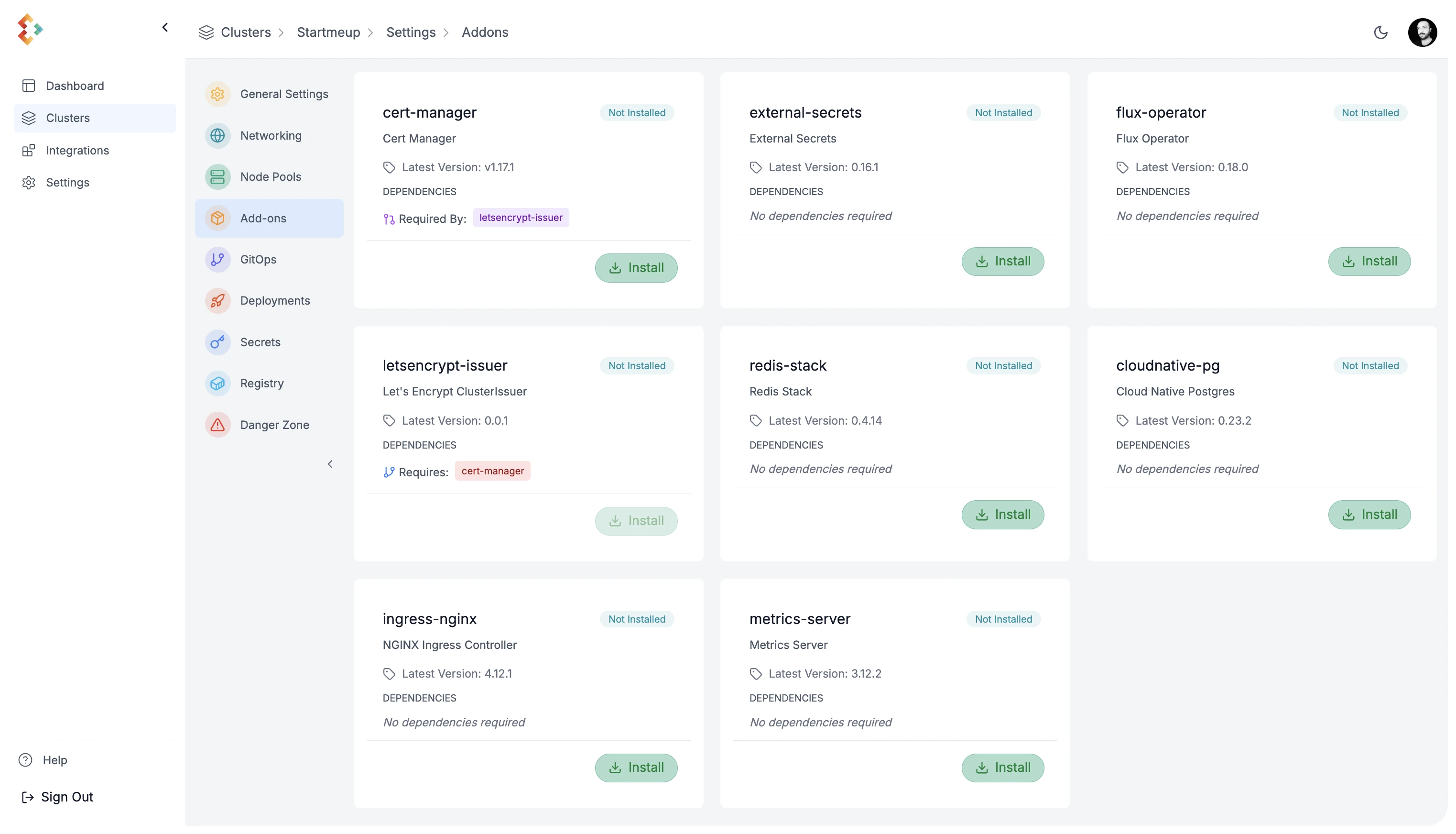
Edka provides a curated set of production ready add-ons that can be installed on your cluster. For this guide, install the following:
- Envoy Gateway
Gateway API is the recommended way to expose your applications to the internet in Edka.
It automatically provisions a load balancer from your cloud provider and configures the necessary rules to route traffic to your applications.
- Certificate Management
It integrates with Gateway API and legacy ingress controllers to automatically provision and renew TLS certificates for your applications.
- Certificate Issuer
This is required to communicate with the provider for your certificates, in this example Let’s Encrypt, but you can configure other issuers directly in your Kubernetes cluster. Cert Manager add-on is required for this to work.
- Cloud Native Postgres
This is a PostgreSQL operator that automates the provisioning and management of PostgreSQL clusters on Kubernetes. It covers the full lifecycle of a highly available PostgreSQL database cluster with a primary/standby architecture, using native streaming replication.
- External Secrets
This add-on allows you to sync secrets from external providers into your Kubernetes cluster. It supports a wide range of providers, including AWS Secrets Manager, HashiCorp Vault, Doppler, and more.
2. Customize Your Add-Ons
Section titled “2. Customize Your Add-Ons”Some add-ons require additional configuration. While we are working to automate this, some manual steps are currently needed.
Gateway API
Section titled “Gateway API”Point one or more domain or subdomain DNS records to your cluster’s primary Gateway API endpoint. You can find this endpoint in the cluster overview, under Gateway API.
External Secrets
Section titled “External Secrets”To allow your cluster to fetch secrets from an external provider (this example uses Doppler), create a secret in your cluster with the provider’s credentials. This can be done through the Edka dashboard and referenced in GitOps later.
In your cluster’s Settings, navigate to Secrets and create a new secret with the following values:
- Name: doppler-token-auth-api
- Namespace: external-secrets
- Key: dopplerToken
- Value your-doppler-token
Press Create Secret to save the secret.
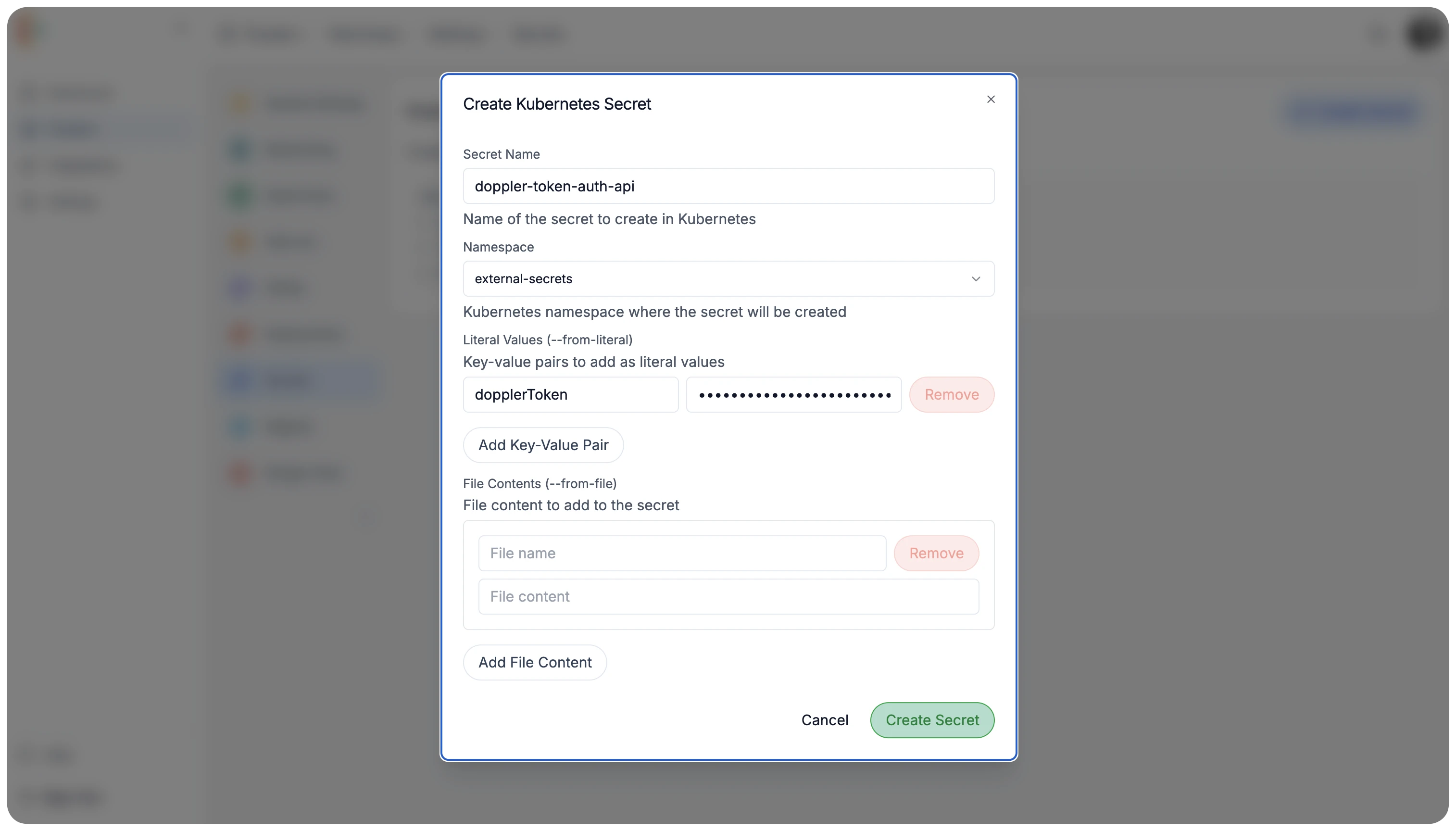 The ClusterSecretsStore will use this secret to authenticate with Doppler and fetch secrets for your projects.
In the blueprint repository, edkadigital/blueprint you can find the configuration for the secrets store. You can also create your own secrets store configuration and reference it in your GitOps repository.
Cloud Native Postgres
Section titled “Cloud Native Postgres”This add-on requires several credentials for your PostgreSQL database cluster. The blueprint repository is configured to fetch secrets with the following names from Doppler. You will need to create these in your Doppler project:
- Bootstrap Database Credentials:
POSTGRES_USERPOSTGRES_USER_PASSWORD
- Cluster SuperUser Credentials:
POSTGRES_SUPERUSERPOSTGRES_SUPERUSER_PASSWORD
- AWS S3 Credentials (for database backups):
ACCESS_KEY_IDACCESS_SECRET_KEY
The blueprint repository is configured to automatically use these Doppler secrets to create the necessary Kubernetes secrets in your cluster.